
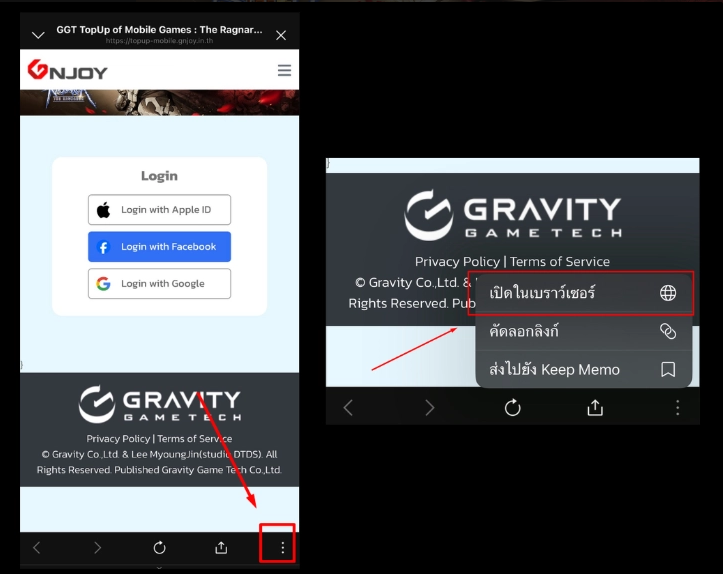
For users accessing the top-up website through the LINE application:
1. Tap the “…” icon at the bottom-right corner of the screen > Select “Open in Browser”
2. After opening in the browser, access the top-up website by clicking >> The Ragnarok
3. Log in and proceed with your transaction immediately
------------------------------------------------------------
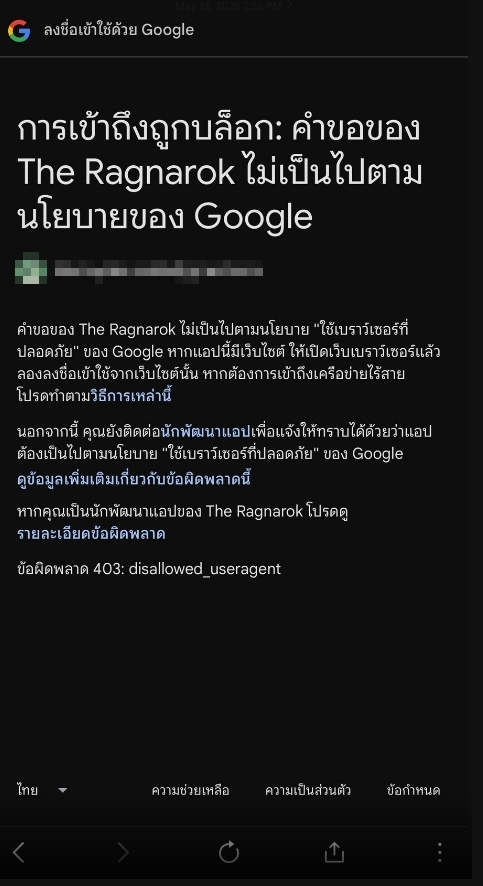
If you encounter an “Access Blocked” notification:
1. Please access the top-up website >> The Ragnarok
2. Tap the “…” button at the bottom-right corner > Select “Open in Browser” such as Google Chrome or Safari
3. Then log in again to proceed with your top-up transaction through the website
Was this article helpful?
That’s Great!
Thank you for your feedback
Sorry! We couldn't be helpful
Thank you for your feedback
Feedback sent
We appreciate your effort and will try to fix the article